
Table of contents
TL;DR
- Automate blog content tasks using tailored tools.
- Maintain high content quality with human review steps.
- Streamline editorial calendars for consistent output.
- Reduce workload stress and publishing bottlenecks.
You’ve spent many hours researching keywords, outlining drafts, editing, and scheduling posts—yet creating blog content still takes up your whole workweek. This leaves you behind on other important tasks. If you juggle multiple roles as a founder, marketer, or part of a small business team, keeping up with the pace and quality needed for good SEO often means losing valuable time, energy, or worse, getting poor results.
This article shows how you can automate your blog content process without lowering quality or search rankings. You’ll learn what to set up before you begin, simple steps to automate content planning, writing, and publishing, how to avoid common automation mistakes, and how to check if your new process is working. If you know blog content takes too much time but worry automation will hurt quality, this guide is for you. Here is the shortcut you need: you can automate your blog content creation while keeping your site’s quality and visibility intact.
What You Need Before You Start
Before automating your blog content workflow, it’s smart to check you have the basics in place. These essentials help ensure automation actually saves time instead of causing new headaches later.
Essential tools and accounts checklist
A successful content automation setup requires a handful of key accounts and integrations before you begin. You’ll need an active website on a supported CMS like WordPress, Ghost, or a system that supports webhooks, since most platforms—including SEOLadders—connect directly to your site to publish content. Having access to your Google Search Console or equivalent analytics is vital for relevant topic planning and tracking what’s working.
Here’s a practical checklist to get started with most automation platforms:
Time and skills required for automation
Launching blog content automation still demands an initial investment of time and a basic skill set, even with automation tools. Most users spend several hours upfront connecting systems, importing keywords, and reviewing brand setup. Expect to block out 1 to 2 working sessions for integration and another session to customize voice or style settings if the platform allows it.
It helps if someone on your team is comfortable with basic website admin tasks like plugin installation or managing API keys. While you don’t need deep SEO or coding skills, being able to follow product documentation and troubleshoot simple permissions issues will avoid unnecessary delays.
Setting realistic expectations for content automation
Content automation scales production but isn’t a magic fix for all your quality or ranking challenges. According to Dziner Studio, automation tools can save time and make high-volume publishing easier, but they still need smart human review—especially to avoid off-brand messaging or SEO gaps.
Here are a few baseline expectations before launching:
Tip: Set aside time before launch to gather brand assets and clarify your review process. This speeds up both onboarding and future approvals.
How to Automate Your Blog Content Workflow
Automating your blog content workflow can help you regain valuable time while ensuring every article supports your visibility and SEO efforts. The key is to structure your workflow for both efficiency and quality at every stage.
1. Choose your content planning tools
Content automation tools are software platforms that automate repetitive tasks like content planning, drafting, and publishing, offering features such as AI-powered generation, SEO recommendations, and editorial workflow management, according to SEOSandwitch. Start by mapping out your needs: do you require only drafting support or end-to-end automation?
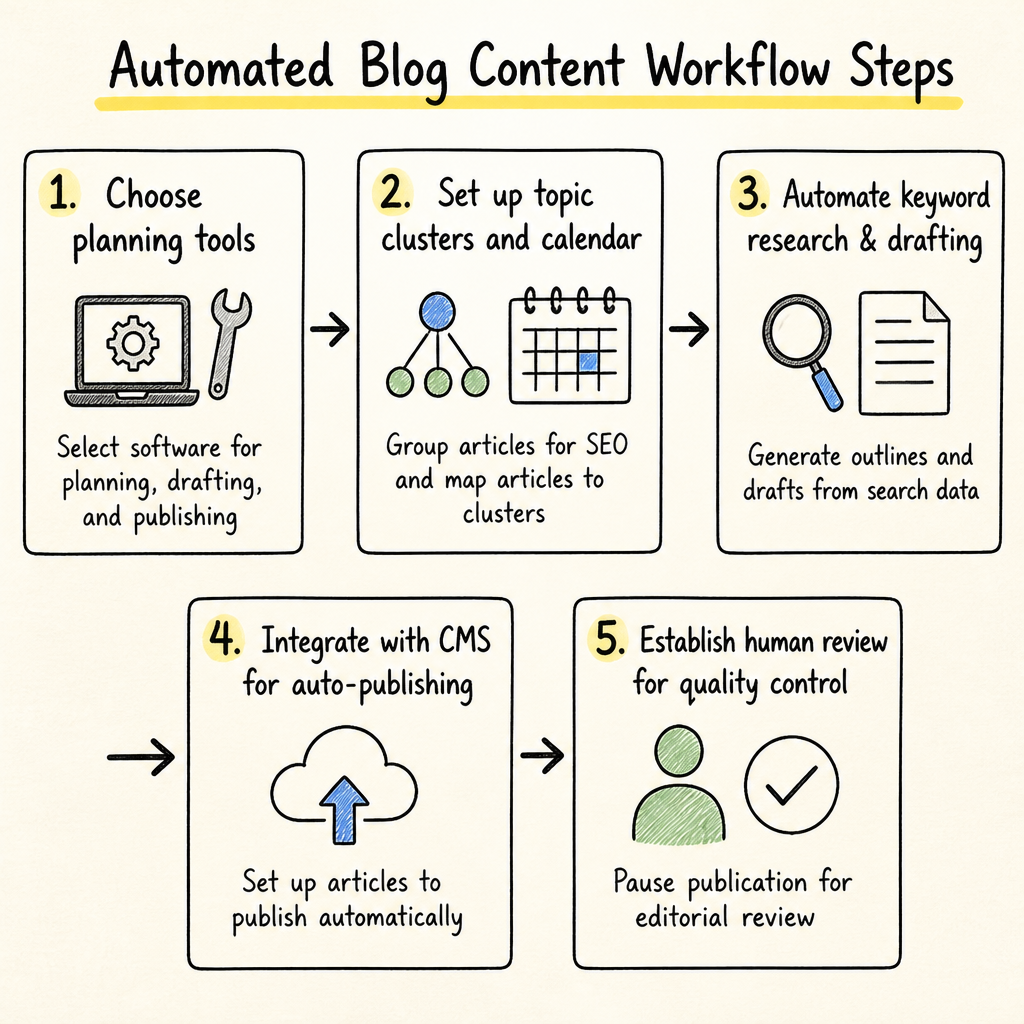
2. Set up topic clusters and editorial calendar
Topic clusters group related articles around a central pillar, improving SEO and making content planning scalable. Setting these up from the start keeps your topics tightly aligned to your audience’s search intent. Use your content platform’s clustering tools or manual keyword mapping to define clusters based on real queries and map each article to its place in that structure.
3. Automate SEO keyword research and article drafting
Automated keyword research and article drafting lets you generate optimized content faster, based on real search data. Modern solutions scan your site and competitor rankings to find high-impact keywords, then generate outlines and drafts designed to answer search intent. Platforms like SEOLadders create a research-informed knowledge base and plan one article per day around prioritized clusters, avoiding duplication or off-topic writing to keep your content focused and effective.
4. Integrate with your CMS for auto-publishing
Automated CMS integration publishes articles live without manual uploads, ensuring regular content flow even if your team is hands-off. Most automation tools connect through plugins, admin keys, or secured webhooks. SEOLadders, for example, offers direct WordPress publishing, supports Ghost and Notion, and can deploy to other systems via webhook in formats like Markdown and HTML.
5. Establish a human review step for quality control
A human review step protects your brand voice and ensures that automated posts meet your quality standards. Automation should speed up your workflow, not remove oversight. Most tools let you pause publication until content is reviewed, as SEOLadders' review mode does.
Expert Insight: Automating doesn't mean giving up control—adding a review step before publishing is the single best way to maintain quality while still saving time.
My website's blog content creation is eating up too much time and I'm not sure how to automate without losing quality. How can I streamline this?
For small teams, maintaining consistent, high-quality blog content while achieving measurable results feels overwhelming. Without enough hands to divide tasks, each piece demands more time and energy, slowing progress and risking burnout. To ease this, start by mapping your content calendar with clear priorities, focusing on topics that directly engage your audience and drive traffic. Next, batch your tasks—draft multiple outlines or headlines at once to reduce setup time per post. Use simple templates to speed up formatting without sacrificing brand voice. Schedule regular short review sessions instead of lengthy edits to keep quality steady without paralysis. For example, one team shifted from ad hoc writing to a weekly 2-hour planning block for three posts, cutting total creation time by 30% and maintaining steady traffic growth. This targeted approach balances consistency and output, making automation mostly a time-saving aid rather than a risk to standards.
Defining your content strategy and goals
A clearly defined content strategy sets the direction for effective automation and keeps your blog focused on measurable outcomes. Start by mapping target audiences, business objectives, and ranking aspirations into a plan rooted in keyword and topic research. Maintaining clarity on topics, tone, and outcomes reduces wasted effort and stops content from drifting off-message—a risk that grows as you scale output. According to UMATechnology, building a calendar that schedules ideas, deadlines, and actions upfront is key to staying organized and sustaining quality.
Using SEOLadders for daily article scheduling
SEOLadders automates topic selection, writing, and daily publishing, letting you keep a steady output without manual planning. Once your site is connected, SEOLadders builds topic clusters based on your search data and generative AI gaps, then fills a calendar with 30 daily article slots every month. Each article draws from your knowledge base, uses real references, and is scheduled for immediate publishing as soon as it’s written. You can adjust the calendar by moving articles around or deleting those you don’t want, but you can’t swap them mid-month.
Maintaining voice and editorial standards during automation
Editorial standards and brand voice can be preserved during automation with the right controls and processes. SEOLadders restricts its drafts to your knowledge base, which you can edit or expand for accuracy and brand fit. Plain-language edit requests let you tweak content before publication—especially useful when tone or detail needs correction. Each article is structured with features that support quality, including key takeaways, schema markup, images, and citations.
Automatic internal links minimize SEO slip-ups from inconsistent linking. To keep a human touch and factual integrity, SEOLadders avoids generic AI phrasing and lets you preview and adjust any article in draft. This approach ensures the final content aligns with your brand’s voice and maintains editorial consistency, preventing automation from sacrificing quality or distinctiveness.
Expert Insight: Automation multiplies the results of any content strategy—good or bad. Invest time upfront to clarify goals and messaging before scaling up.
Common Mistakes and How to Fix Them
Automating your blog content workflow can create new challenges if you aren't careful with the process. Here are the most frequent issues—and what to do about them.
Over-automation leads to off-brand or generic content
Excessive automation often results in blog articles that sound generic or stray from your brand’s unique voice. When you rely entirely on automated tools to plan, write, and publish content, you risk producing pages that echo competitors rather than standing out. According to HypeSuite, AI-driven content quality control helps avoid “AI sameness” by enforcing checks for originality and duplication. Practical fixes include running plagiarism scans, reviewing drafts for tone, and ensuring each piece reflects your messaging strategy.
Consider using automation platforms that map keywords into clusters tied to your brand themes and let you review drafts before publishing, as SEOLadders content writing does. This helps maintain individuality even with a fully automated workflow. Establish clear guidelines for human review at critical stages, set quality benchmarks, and regularly update your content standards to keep the voice consistent and aligned with evolving brand goals.
Skipping human review damages content quality
Bypassing human review can introduce factual errors, style inconsistencies, and SEO gaps into your automated blog content. AI-generated content still needs checks for accuracy, relevance, and tone. ClickUp found dedicated specialists and defined content strategies are key to maintaining consistency and upholding brand standards. To fix this, set mandatory checkpoints before publishing: editors should review intros and major sections, scan for factual mistakes, and ensure brand-voice alignment.
Some automation tools let you hold articles in review mode before they go live—SEOLadders’ Schedule & publish setting for manual review is a direct example. Even a quick editorial pass can prevent off-message or unreliable content from slipping through.
Losing track of publishing consistency
Automated workflows can still fail if you lose oversight of your blog’s publishing calendar or cadence. Missed posts, overlapping subjects, or irregular timing confuse both readers and search engines. Automated systems help maintain a steady flow—but only if you monitor what goes live and when. Use dashboards to visualize scheduled posts, set up alerts for skipped days, and review the calendar for gaps or cluster overlap.
Solutions like SEOLadders make it easier with daily auto-publishing and visual calendars, as shown in their scheduling overview. For more ideas, see Managing SEO Tasks Manually Is Overwhelming for why cadence matters. Consistency wins authority; automation just lowers the risk of falling behind.
Tip: Always build in periodic spot checks, even if you trust your automation—manual review still catches things automation can miss.
How to Check It Worked
Once you've set up automated blog content, it's essential to confirm that your efforts are having a real impact on traffic, engagement, and technical site health. Getting this right safeguards both your time and your search performance.
Tracking rankings and visibility improvements
Tracking your search rankings and brand visibility is the fastest way to see if your content automation is delivering real gains. Automated platforms like SEOLadders include built-in rank tracking for your site’s pages and also monitor your citation presence across AI engines like ChatGPT, Gemini, and Google AI. You’ll see reports showing where your brand ranks versus competitors, which buyer questions your pages appear in, and even when you’re missing from key AI outputs. Key steps include:
Measuring audience engagement and conversions
Audience engagement and conversion rates show if your automated content actually resonates with readers and drives business outcomes. Once new blog articles go live, use analytics tools (such as Google Analytics) to track:
- Page views and visitor time on page to see if articles keep attention.
- Click-throughs and call-to-action (CTA) responses to measure how often readers move to product pages or signup forms.
- Conversion events (newsletter opts-in, purchases, demo requests) tied to blog entry points.
Make it routine to match this engagement data with your content calendar.
Verifying technical SEO and publishing success
Consistent technical SEO checks confirm your automated posts are both live and fully optimized. Automated platforms like SEOLadders perform weekly site audits that flag indexing issues, meta data errors, or internal link problems. Owners should routinely check:
- Audit and health scores after new posts go live.
- Indexation status in Google Search Console for each recently published article.
- Technical fixes applied—are recommendations from site audits implemented before and after automation?
Make a checklist:
- Review new posts’ canonical tags, structured data, and schema markup.
- Check for broken links or media issues in newly automated content.
- Confirm key pages are not blocked by robots.txt or noindex tags.
Tip: Don't only check top-level metrics—use weekly or monthly reviews to catch slow declines or sudden drops after automating. Minor technical errors can quietly undermine visibility if overlooked.
Tools That Help Keep Content Automation Efficient
Choosing the right automation tools is critical if your website's blog content creation is eating up valuable time. This section highlights proven solutions and helps you figure out what fits your workflow best.
SEOLadders: Automated planning, writing, and publishing
SEOLadders automates the entire pipeline from keyword research to publishing with a daily, fact-based article schedule. The tool connects directly to your website and builds a product knowledge base from up to 100 pages, so every article is written using accurate, brand-specific information. Each article is published automatically on a set calendar—one per day, including weekends—with no manual writing or planning required.
Other popular content automation tool options
Beyond SEOLadders, several notable tools support efficient blog content automation in 2026. Many focus on specialized publishing, content ideation, or scalability for different site types. According to RebelGrowth, product selection often comes down to matching key capabilities to your content workflow needs.
Here's how top alternatives typically compare:
| Tool Name | Article Volume | Supported Platforms | Visibility Tracking | Site Audits | Starting Price |
|---|---|---|---|---|---|
| SEOLadders | 30 articles/month | WP, Ghost, Notion, Webhook | Yes | Yes | $97/month per site |
| SEObot | 9–50 articles/month | WP, Webflow, Ghost, Framer, Notion, More | No | No | $49/month (Starter) |
| SurferSEO | Not specified | WP, Webflow, others | No | No | Subscription—check site |
| Jasper AI | Subscription-based | WP, others | No | No | Subscription—check site |
- Feature coverage varies: Only some provide both publishing and SEO health tracking in one platform.
- Pricing and automation depth differ: Some entry options lack advanced tasks like rank monitoring or topic clustering.
How to decide which blog automation tools fit
Selecting the best automation tool depends on your content bottleneck and workflow needs. Start with these steps to match a tool to your pain points:
- List your automation goals such as reducing time on topic research, scaling writing, or improving search visibility.
- Check platform compatibility with your CMS (e.g., WordPress, Ghost, or use webhook integrations).
- Review key feature gaps—tools like SEOLadders offer visibility tracking and internal linking, while others may focus only on publishing.
- Compare trial options so you can measure impact before committing long-term spending.
Why it matters:
- Automated content planning prevents last-minute scrambling for new topics.
- Built-in SEO monitoring ensures you’re not missing out on critical ranking changes.
- Workflow fit—choosing a platform that matches your publishing schedule and review style ensures adoption sticks.
Expert Insight: Even the best automation needs regular review—check that scheduled topics are still relevant and align with changing audience demands.
Frequently Asked Questions
My website's blog content creation is eating up too much time. Can any tool truly automate this without losing quality?
Yes, tools like SEOLadders automate blog content creation by handling research, writing, and publishing 30 optimized articles per month. It ensures quality by integrating keyword clusters, AI visibility tracking, and editorial control before publishing. This streamlines your process without sacrificing SEO or content standards.
What’s the best way to maintain my brand’s voice with blog content automation?
Maintain your brand's voice in automated blog content by using tools that write in your specific style and allow you editorial control before publishing. SEOLadders, for example, crafts articles in your brand voice, includes FAQs and citations, and lets you review content prior to publishing, ensuring consistency without sacrificing quality.
Do SEO automation tools replace human editors?
SEO automation tools do not fully replace human editors; they automate research, content creation, and publishing to save time but still allow editorial control and manual review. SEOLadders, for example, automatically writes and publishes optimized articles but lets you review and adjust content before it goes live. This balance helps maintain quality while streamlining blog content creation.
How does SEOLadders differ from WordPress plugins or Zapier automations?
SEOLadders automates the entire SEO content workflow—researching keywords, writing, publishing, auditing, backlink outreach, and tracking AI visibility—beyond what WordPress plugins or Zapier automations usually handle. It integrates with WordPress and other CMSs for scheduled publishing, but uniquely provides continuous SEO optimization and AI search monitoring, not just task automation.
What is a common misconception about blog automation and quality?
A common misconception is that automating blog content inherently lowers quality. In reality, platforms like SEOLadders automate research, writing, and publishing while maintaining SEO and AI-driven relevance to ensure consistent, high-quality articles without manual effort.
Conclusion
Saving time on content creation doesn't have to mean cutting corners or letting your search rankings slip. This article showed how the right preparation, smart automation practices, and regular quality checks can keep your workflow efficient and your blog's value high. SEOLadders is excellent for founders and marketers who want done-for-you topic research, daily article writing, auto-publishing, and ongoing SEO monitoring—without needing to plan, write, or chase algorithms themselves. No other solution here offers real-time AI search visibility, daily publishing, and a hands-off backlink workflow in one monthly plan.
Here's how you can start simplifying your process today:
- Review your existing content workflow for avoidable bottlenecks
- Set up the right automation tools and integrations for publishing
- Schedule regular quality checks and SEO audits
- Try SEOLadders with its 7-day free trial to see daily publishing and AI visibility tracking in action It pays to reclaim your calendar—especially when you don't have to settle for average content.
Ready to take back your time? See how SEOLadders automates keyword research, content writing, and scheduling—without compromising quality—on the feature walkthrough.
Want this done for you? SEOLadders finds the topics, writes the articles, and gets you cited by AI and ranking on Google, on autopilot.
7-day free trial · Cancel anytime