
Table of contents
TL;DR
- Optimize on-page elements with strategic keywords
- Boost site speed and mobile responsiveness
- Use SEO plugins to automate critical tasks
- Build quality backlinks for authority
Struggling to get your WordPress site to climb the Google rankings, even after hours spent tweaking plugins and rewriting posts? You’re not alone—many site owners, digital marketers, and content creators find WordPress SEO confusing, and small mistakes can quietly hold your pages back for months.
This guide will make "how to improve SEO in WordPress" absolutely clear. You’ll get plain-language explanations of WordPress SEO basics, learn why optimization matters, discover a step-by-step improvement process, and see examples of real brands who turned their results around. No fluff, just practical tactics you can start today.
What Is WordPress SEO? A Clear Definition
WordPress SEO refers to the process of optimizing your WordPress website so search engines can understand, rank, and display your content for relevant queries. It's how you ensure that valuable pages are visible to people searching for topics you cover. Here's what it means within the platform, the language you’ll run into, and how WordPress handles search visibility out of the box.
Defining on-page SEO within WordPress
On-page SEO within WordPress is the ongoing practice of optimizing individual posts, pages, and taxonomy archives for search engine visibility. This means fine-tuning titles, headings, meta descriptions, internal links, images, and keyword usage within the content areas. According to High Level Studios, these on-page factors play a direct role in how search engines interpret your site’s relevance and authority.
In practice, WordPress makes on-page SEO relatively accessible—most edits happen within the Block or Classic Editor, and plugins extend your options for customizing metadata. A common pitfall? Ignoring the default settings, which often means missing out on rich snippets or serving duplicate content. Simple adjustments, like unique title tags and targeted H1s, directly affect rankings. For an automated approach to on-page optimization, consider exploring content automation solutions that integrate with WordPress workflows.
Key WordPress SEO terminology
Key WordPress SEO terminology includes terms like slug, permalink, meta description, taxonomy, and canonical URL. "Slug is the customizable portion of a URL after your domain name, often matching the post title for clarity."
You’ll run across these concepts every time you edit or publish content in WordPress. For example, permalinks control how URLs appear across your entire site, which heavily influences both user experience and search engines. Meta descriptions provide a summary for search snippets. Taxonomies (like categories and tags) organize content for both readers and robots. Canonical URLs signal the preferred version of a page to avoid duplicate content flags.
If you’re researching how to improve SEO in WordPress, building familiarity with these concepts is foundational. You can get deeper insights and keyword ideas from tools like Keyword Ideas.
How WordPress configures search visibility
WordPress configures search visibility through a mix of settings, theme capabilities, and plugin features. The main switch is found under the 'Settings > Reading' menu—disabling "Discourage search engines from indexing this site" is required for your content to appear in Google’s results.
Themes handle how your metadata, structured data, and headings are rendered. Many offer built-in schema or support for SEO plugins, which can automate markup and meta tag optimization. SEO plugins also let you edit robots.txt, sitemaps, canonical tags, and social metadata without digging into code. In real-world use, I’ve seen teams overlook the default noindex setting—causing new or staging sites to stay hidden for weeks. A technical SEO audit, like those available with Technical Health, can flag these visibility issues quickly.
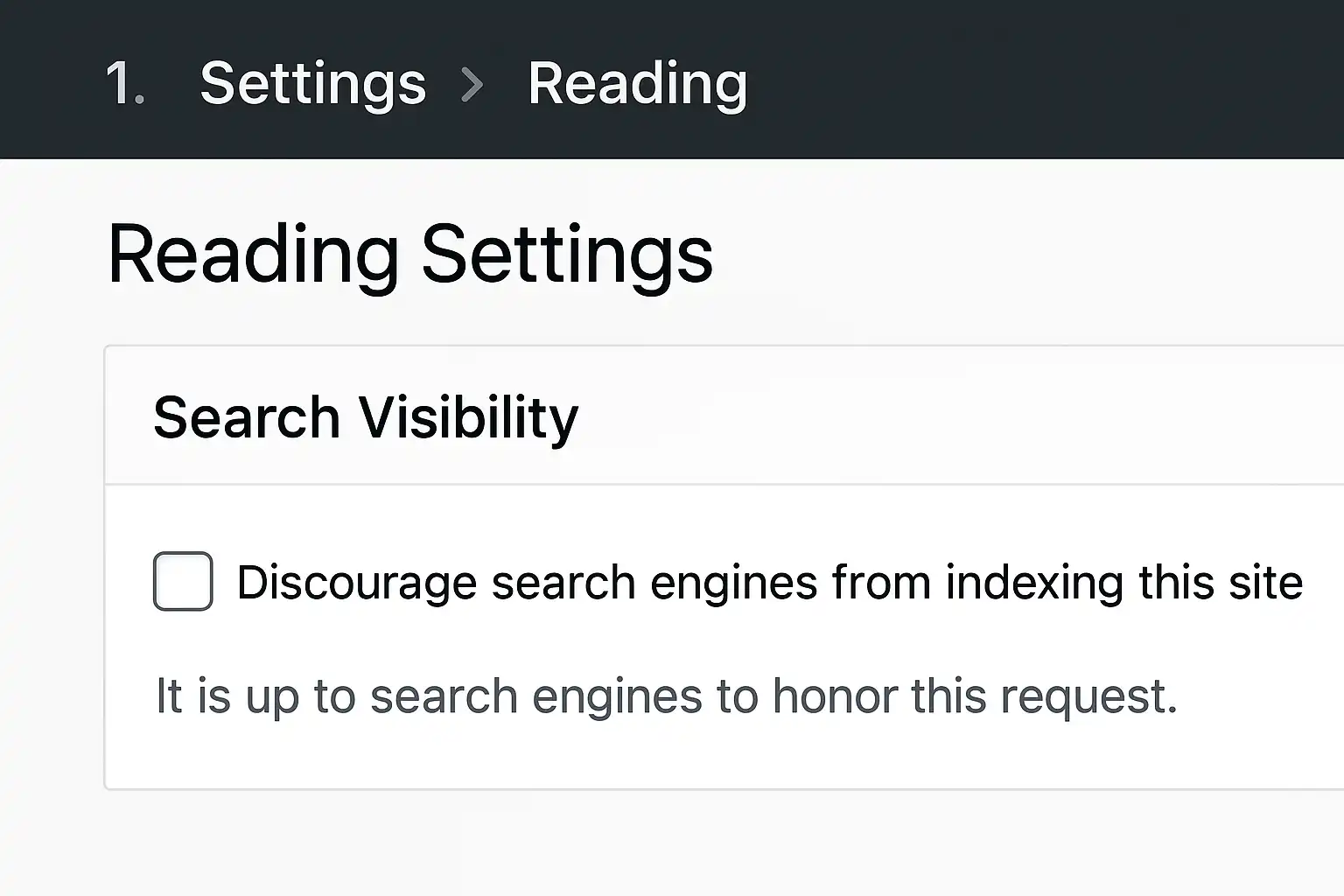
Tip: Always double-check your WordPress site's visibility settings before publishing—it's surprisingly common to leave "Discourage search engines" enabled by accident after launching a new site.
Why WordPress SEO Matters for Content Creators
Ranking well in search is rarely luck—especially on WordPress. Without solid SEO, even great content gets buried in Google results. Here’s why every content creator needs to focus on search optimization if they want reliable growth.
Key Benefits: Higher traffic and visibility
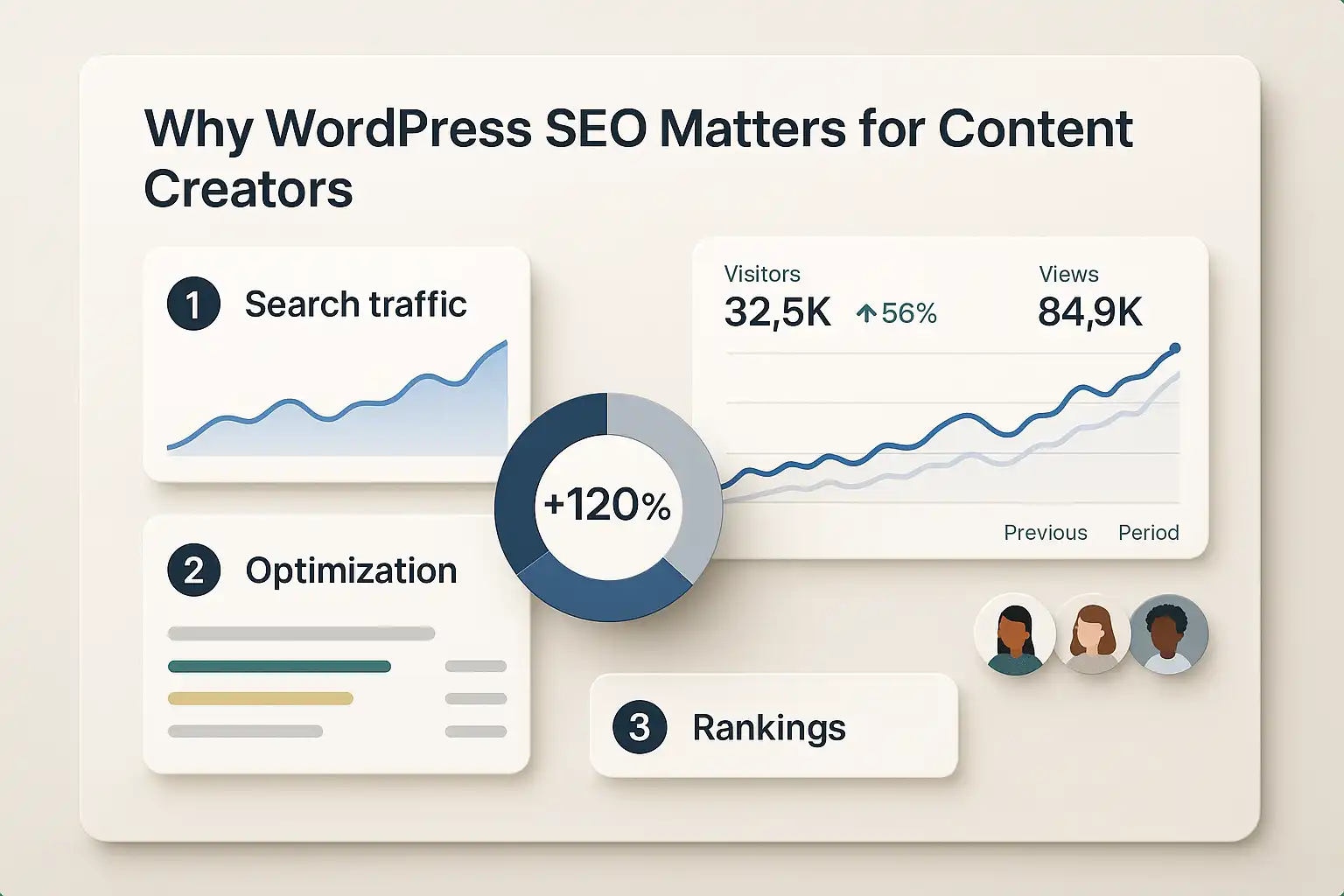
WordPress SEO is the process that drives increased search traffic and elevates your site’s visibility in a crowded web ecosystem. Optimizing for search engines helps content stand out, whether you’re producing articles, guides, or ecommerce listings. According to Mediumpulse, content creators who consistently apply SEO best practices see growth in organic visitors and stronger authority over time.
In practice, improved visibility can mean:
- New audiences discovering your content through Google search
- Evergreen blog posts bringing recurring visitors
- More inbound leads, subscribers, or sales without extra ad spend
For a look at how automation can support growth, see how content automation works for WordPress.
Common Use Cases: Blogs, business sites, and ecommerce
Content creators benefit most from WordPress SEO when their use case matches search-driven intent. Blogs, business websites, and online shops all have unique needs:
- Blogs: SEO turns one-time posts into lasting sources of traffic. Search-optimized posts keep bringing in readers for years, making each article an investment.
- Business sites: Local SEO and well-targeted pages help service providers get found by customers in the right geography or niche. There’s often a direct impact on inquiries and bookings.
- Ecommerce: Product SEO brings buyers directly to product pages, bypassing heavy ad spend. Optimizing titles, descriptions, and metadata makes listings more competitive.
Explore how WordPress integrations can connect your SEO efforts to publishing workflows.
Ranking Impact: What we've seen from client sites
Consistently applying WordPress SEO strategies delivers noticeable ranking improvements and organic growth. From client experience, small technical tweaks—like smart keyword targeting or faster page loads—often move sites out of the first-page search "dead zone."
We’ve seen content creators struggle when skipping foundational steps such as keyword research or ignoring technical health. Once these are put in place, even modest sites can start ranking for competitive terms. Clients using structured processes and tracking tools—like those found in keyword research solutions for WordPress—tend to gain ground steadily.
The biggest surprise? Ranking results are rarely overnight. But for creators willing to iterate and monitor progress, results compound over time.
Expert Insight: The path to higher rankings with WordPress is rarely about one-off tricks—it’s the result of steady, methodical SEO effort tailored to your content type. Focus on process over hacks.
Core WordPress SEO Concepts You Need to Know
Understanding key SEO concepts for WordPress is the foundation for lasting results. If you want to know how to improve SEO in WordPress, these are the strategies and technical best practices that actually move the needle.
Keyword research strategies for WordPress sites
Effective keyword research for WordPress sites is the process of finding terms and topics your audience is actively searching for and targeting them within your site's content. The best approach usually involves:
- Identifying keywords that match your site's authority—chasing highly competitive topics rarely works for newer sites.
- Focusing on search intent by analyzing what users want when they search for a phrase. (Are they seeking answers, making a transaction, or just browsing?)
- Using tools that reveal search volume and ranking difficulty. In practice, most WordPress owners find Topical Authority solutions that classify opportunities into “realistic”—based on their domain, not general web difficulty—saves time and boosts results fast.
- Mapping content to keyword clusters—not just single phrases—for deeper topical authority.
If you’re not sure where to start, free tools like Keyword Ideas can kickstart brainstorming for new articles. The key is prioritizing keywords your site can genuinely compete for, rather than trying to outrank everyone overnight.
Technical SEO: Site speed and mobile responsiveness
Technical SEO for WordPress is maintaining your site’s performance, accessibility, and structure so search engines can easily crawl and rank your content. Site speed isn’t just a bonus—slow loading times directly harm rankings and frustrate users. According to Preliminary Road to 5.9, even minor performance improvements can affect visibility and engagement noticeably.
Practical experience shows that many themes and plugins slow down sites if not routinely audited. Common strategies for speed and mobile optimization:
- Run a technical health audit—Identify and fix bottlenecks, broken links, or heavy scripts with tools like Technical Health.
- Choose a lightweight theme—Not all themes are optimized for speed or mobile by default.
- Test and adjust for mobile—Use Google’s Mobile-Friendly Test to catch issues early. Prioritize Core Web Vitals, especially for mobile users.
Content optimization and meta tags in WordPress
Content optimization in WordPress is the ongoing process of refining on-page elements—like titles, meta descriptions, and headings—to align better with your target keywords and user intent. Meta tags, when used correctly, help search engines understand and present your pages accurately.
A typical workflow looks like this:
- Use the page or post editor to add a clear, concise title containing your primary keyword.
- Write a compelling meta description by hand or with a tool like the Meta Description Generator.
- Structure content with logical H2 and H3 headings, keeping paragraphs brief.
Teams often overlook the details here. It’s surprisingly common to find duplicate titles, missing descriptions, or inconsistent keyword targeting, which can quietly undermine rankings. In practice, routine reviews and updates of on-page elements make a measurable difference over time.
Expert Insight: Regular audits—both for keywords and technical issues—help spot invisible SEO problems that tools alone may not catch. A manual review every quarter pays off.
How to Improve SEO in WordPress: A Complete Process
Improving SEO in WordPress is a step-by-step process that involves more than just basic setup. To get your site ranking, you’ll need the right tools, careful on-page optimization, and attention to technical details affecting performance and visibility.
Step 1: Install and configure an SEO plugin
Selecting the right SEO plugin is the foundation for improving WordPress SEO. An SEO plugin is a tool that adds extra fields and automation for search-related features inside your dashboard. Popular plugins like Yoast, All in One SEO, and Rank Math make it easier to edit meta titles, descriptions, breadcrumbs, XML sitemaps, and other critical fields.
According to Udemy, these plugins help site owners avoid missing basic optimizations that would otherwise require manual coding. Installation is quick: search "SEO" in your plugin directory, pick the tool that matches your needs, then follow the guided setup. In practice, most teams overlook plugin settings that control indexability or sitemaps—double-check these to avoid issues (it’s easy to accidentally hide a site from Google). If you’re automating content, review WordPress integration options to streamline publishing and meta data handling.
Step 2: Optimize on-page elements and structure
Optimizing on-page elements means editing your pages so each one targets a focused, high-intent keyword. On-page SEO is the process of refining titles, headings, meta descriptions, image alt text, and internal links to match both search intent and technical best practices.
Start every page with:
- A unique, descriptive H1 (not just copying your title)
- Meta descriptions crafted for clicks
- At least one focused keyword in the first 100 words
- Alt text for every image
Internal linking is another overlooked tactic. Add anchor links to related articles or resources, such as using a tool for Keyword Ideas to find target terms. In our experience, tweaking heading hierarchy (H2, H3) to be clear and logical helps both users and Google understand your content’s flow. Sites with flat, repetitive structures tend to underperform versus those that clarify hierarchy and connect related pages.
Step 3: Address site speed, security, and mobile usability
Improving site speed, security, and mobile usability is essential for WordPress SEO. Site speed directly affects Google rankings and bounce rates, while security and mobile responsiveness influence user trust and experience.
Use image compression, caching plugins, and a reliable host to speed up loading. According to WPBlog, a regular technical audit—checking for slow pages, broken links, and missing HTTPS—can uncover hidden ranking problems. Responsive themes and testing your mobile experience are a must; even small formatting glitches reduce engagement on phones. Teams often find that these technical tweaks have an outsized impact, but require periodic review. Be sure to check your technical site health using a purpose-built technical audit tool to catch new issues before they hurt rankings.
Expert Insight: After initial setup, it's common to overlook plugin or theme updates—staying current prevents vulnerabilities and plugin conflicts that quietly hurt SEO over time.
Real-World WordPress SEO Success Examples
Not every WordPress SEO win happens in theory—real sites see real results. Here’s how three different organizations transformed their organic traffic by applying key strategies for WordPress SEO improvement.
Example 1: Blog gains with strategic keywords
Targeting high-intent keywords is often the single most effective lever for boosting blog traffic in WordPress. According to Udemy's Complete WordPress SEO guide, identifying low-competition keywords (that still show steady search volume) has a measurable impact on monthly readers.
In practice, content teams don’t just guess at what works. They:
- Use keyword research tools to spot realistic ranking topics (see Keyword Ideas)
- Map each article to unique target phrases
- Monitor the results with tracking tools to tweak underperforming posts
A common pitfall is chasing broad, ultra-competitive keywords—blogs that instead focus on achievable topics quickly notice a climb, sometimes within weeks.
Example 2: Ecommerce site boost from technical fixes
Fixing technical SEO issues can lead to dramatic improvements in search visibility for WordPress ecommerce sites. Technical SEO describes site-wide elements that influence how search engines crawl and index pages.
A typical sequence goes something like this:
- Run a technical audit to find errors (think broken links, duplicate titles, missing alt text).
- Prioritize fixes using an issue severity guide—start where search engines struggle most.
- Rescan and monitor improvements with technical health tools like Technical Health.
Teams often see ranking gains once major crawl or rendering blocks are removed. Honestly, a surprising number of stores have hidden technical barriers holding them back until a fresh audit exposes them.
Example 3: Small business wins with backlinks
Earning relevant backlinks remains a core factor in WordPress SEO, especially for local and service businesses. Backlinks are links from other reputable sites pointing to your content, signaling authority and trust.
Small business owners usually start with:
- Listing themselves in verified online business directories (Directory Studio is designed for this)
- Engaging in industry forums or local partnerships for mentions
- Creating shareable resources (e.g., guides, infographics) that incentivize others to link
A Facts About Backlink Revealed article underlines that the quality—rather than the volume—of backlinks tends to unlock better results over time. It’s slow work, but foundational for growth.
Expert Insight: Success with WordPress SEO rarely hinges on just one tactic—blending keyword targeting, technical fixes, and backlink strategies works best, as these examples show.
Frequently Asked Questions
Does using an SEO plugin guarantee higher rankings?
Using an SEO plugin in WordPress helps optimize your site by managing meta tags, sitemaps, and content structure, but it does not guarantee higher rankings. SEO success also depends on quality content, backlinks, site speed, and user experience. Tools like SEO Ladders automate content creation and keyword targeting, complementing SEO plugins to improve ranking chances.
How much do backlinks impact WordPress SEO results?
Backlinks significantly impact WordPress SEO by signaling authority and trust to search engines. High-quality backlinks can boost your site's ranking and organic traffic. However, backlinks should be relevant and from reputable sources to avoid penalties. Combining backlinks with quality content and technical optimization, like what SEO Ladders automates, offers the best results for improving WordPress SEO.
Is site speed more important than keyword research?
Both site speed and keyword research are crucial for SEO in WordPress, but site speed impacts user experience and rankings directly, while keyword research guides content strategy. Prioritize optimizing site speed to keep visitors engaged, then focus on keyword research to attract relevant traffic. Tools like SEO Ladders help balance these by automating keyword discovery and supporting technical SEO improvements.
Do all WordPress themes support good SEO practices?
No, not all WordPress themes support good SEO practices. SEO-friendly themes are built with clean code, fast loading times, mobile responsiveness, and proper HTML structure. Choosing a theme optimized for SEO helps improve search rankings. SEO Ladders integrates well with SEO-friendly WordPress themes, enhancing content automation without compromising SEO quality.
What is the most overlooked SEO fix in WordPress?
The most overlooked SEO fix in WordPress is optimizing and properly configuring internal linking and URL structure. Many site owners neglect linking related content, which boosts user navigation and spreads link equity. Additionally, setting clean, keyword-rich permalinks and ensuring no broken links can significantly improve rankings. Tools like SEO Ladders help automate and manage these fixes, making maintenance easier for WordPress sites.
Conclusion
Optimizing your WordPress site for SEO doesn’t need to be a guessing game or a drag on your time.
- Make sure your site’s technical settings—like permalinks, sitemaps, and mobile friendliness—are correct right now.
- Install and configure a reputable SEO plugin, then check your posts for titles, meta descriptions, and URL slugs.
- Target keywords matched to your site’s real authority; don’t just copy competitors’ keywords blindly.
- Refresh older posts with better internal links, updated information, and more useful images or schema markup.
- Track your keyword rankings monthly to spot wins and trouble spots before they snowball.
Sticking with these habits will stack wins—and you’ll see steady ranking improvements that actually last. ↑ Back to top
Ready to watch your WordPress SEO actually deliver results? Start your 3-day free trial and see what SEO Ladders’ automation tools can do for your rankings, risk free.
Want this done for you? SEOLadders finds the topics, writes the articles, and gets you cited by AI and ranking on Google, on autopilot.
7-day free trial · Cancel anytime